
Before setting up your X-Plane hardware for maximum performance, you want to ascertain whether the CPU and the GPU are roughly in balance. This will warn you whether you seriously need to consider upgrading to a better CPU or a better GPU before you go to all the trouble of running further tests and setting your whole system up carefully.
In the X-Plane’s settings screen, click on the Data Output tab. Tick the Frame rate checkbox. Start X-Plane
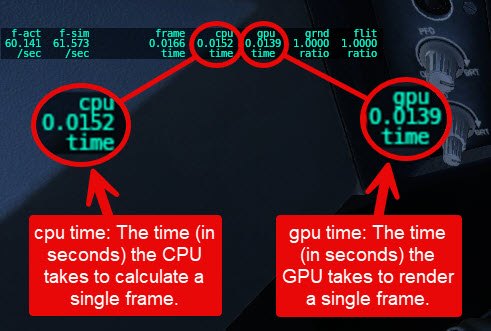
With X-Plane running, compare the time the CPU takes to calculate a frame with the time the GPU takes to render that frame. Ideally, with perfectly balanced hardware, the two numbers should be identical but in actual practice, as you move the view, the two numbers will change. They will also change if you change the graphics settings. The main point here, however, is that if the numbers are reasonably similar, then your hardware is balanced. If one or the other is very much larger, it’s an indication the one is being maxed out while the other is just coasting along. Also if one value is constant while the other fluctuates with different views, then you know that either the GPU or the CPU is saturated and can’t keep up with the other.
For more information on this subject @Janov wrote an excellent post about this bottleneck on X-Plane.org
on X-Plane.org