
Most computers capable of running X-Plane are fitted with Bluetooth capability. If you have a pair of Bluetooth headphones you can easily set up a realistic system where ATC sounds are piped through the headphones while ambient aircraft sounds can be heard through the speaker output(s) of your motherboard.
First make sure Bluetooth is on and the headphones are paired.
Then in the X-Plane SETTINGS –> SOUND section, assign the headphones to Radio Device and the speaker output to Sound Device as shown:
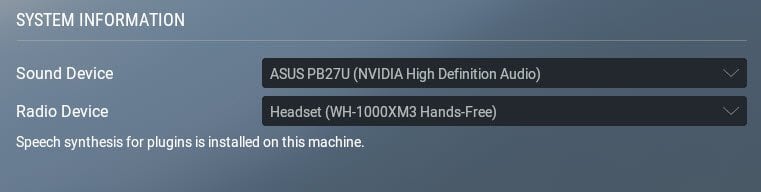
That’s all you have to do except control the respective volumes via the operating system
Extra Tip: Instead of using computer speakers or worse – the internal speakers of a monitor (as shown above), rather connect your motherboard’s Line-Out jack to the input of an old HiFi system lying forgotten in the attic with those big old speaker cabinets, and crank up the volume.
Extra Tip 2: If you don’t have an old HiFi system you can pick up mighty systems that were state-of-the-art fifty or sixty years ago quite cheaply from E-Bay or other online “classifieds” sites. Those are brilliant for an X-Plane simulator.