
As you fly in X-Plane 12 your frame rate is continually changing depending on the current graphic load. If you have a high-end graphics adapter and CPU, or if you tend to fly in country scenic areas far from big cities, you may find that you are “wasting” frames but are still subjected to slight stuttering.
The VSYNC setting can help. Vsync, short for monitor vertical synchronisation, is a setting in X-Plane that helps smooth out visuals. It works by matching the frames your computer generates (frame rate) with the rate your monitor refreshes the image (refresh rate). The NVIDIA driver also has a Vsync setting which accomplishes more or less the same thing. However, they don’t work together, so first instruct the Nvidia Driver to “Use the 3D application setting” :
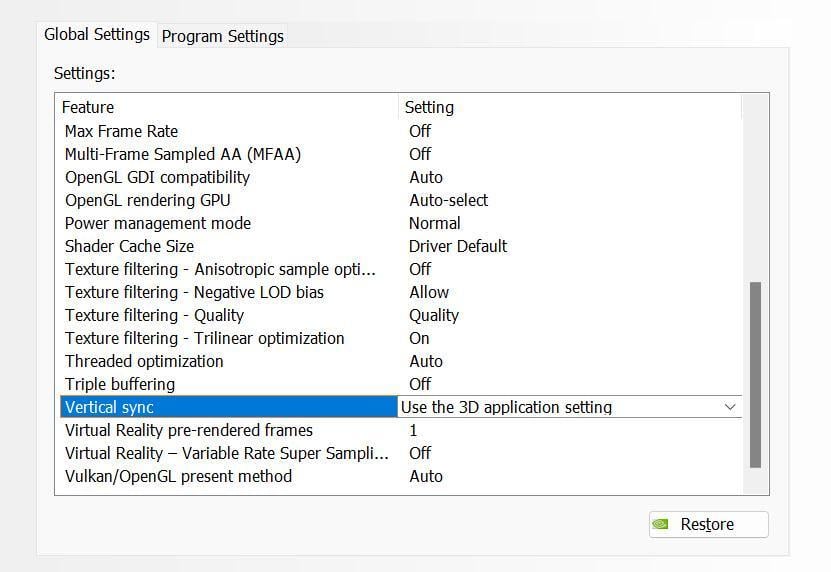
Then tick the Vsync checkbox (located at the bottom of the X-Plane Graphics Settings screen):

Before using this tweak, make sure that Windows has correctly identified your monitor and has applied the maximum frame rate.
If you have low-end hardware, you may find that the penalty for using VSYNC is a slight slowdown of X-Plane. There should be little or no penalty for high-end equipment.
Try this out and see if it helps. If the result is worse, you can always uncheck the Vsync box.
For an explanation of how Vsync works with X-Plane click here