Posted on

A comprehensive Electronic Flight Bag

A real-world EFB (Electronic Flight Bag) is usually an IPAD, Tablet or Laptop computer, containing flight documentation, charts, NOTAMs etc. Airline pilots refer to the EFB constantly because everything they need is in one place.

When simulating flight, we can have a similar idea, with the advantage that we can look at the stuff on a full-size monitor. 
Add-ons like AVITAB enable you to consult such documentation from withing the X-Plane cockpit. 

But when you want to plan and execute your flight, you don’t want to search the Internet for the relevant PDF files. By the time you have everything together, there’s no time left to fly.

My suggestion is to start assembling your own comprehensive Simulation EFB. 

Create a dedicated folder called EFB Briefcase, which has sub-folders containing:
• Documentation of all the aircraft in your hangar. The official repository is here
• Documentation on any add-on software that you use
• Scenery manuals – for simplified airport diagrams, etc
• Charts—every time you come across a chart when browsing, save it in the briefcase for use “one day”. You could also purchase a Navigraph subscription.
• Reviews – The information contained in these reviews can save you an enormous amount of time. Make a point of storing a PDF review or a link to a review on a major site like x-planereviews.com or x-plained.com
• A PDF copy of the offline X-plane manual and a link to the online version.

This Briefcase folder, which usually has many sub-folders, eventually contains everything that we might want to look up when running or configuring X-Plane, or simply as a handy repository to keep all our learning and reference stuff together.
It can be located on the X-Plane computer or, better yet, on a secondary computer, laptop, or tablet.

Not to forget

Your EFB Briefcase should of course contain all your Flying-Low e-books. Browse the whole collection here

Posted on

Screenshots and Better Screenshots

Most X-Plane users know that pressing SHIFT-Key-51x30.jpgSpacebar-30.jpg creates a screenshot which is stored in the …X-plane 12\Output\screenshots folder.

But there is a problem… You have to pause image.jpeg and then change the camera position. But by then you have probably already flown too far.

Here’s a neat trick – at any time during your flight, press image.jpeg to pause and then image.jpegimage.jpegto toggle the replay mode.

The replay scrubber appears : image.jpeg 

and you can now scrub the video to exactly the point in your flight that interests you, use the view controls to adjust the screenshot camera and take your shot.

Then simply toggle image.jpegimage.jpeg again to carry on flying where you left off.

Better screenshots

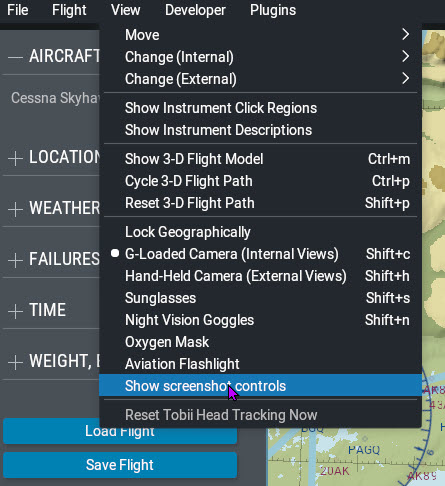
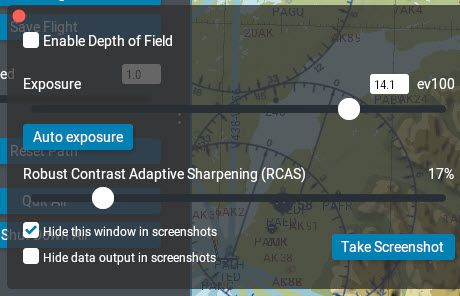
Click View –> Show screenshot controls and a window appears allowing you to adjust exposure, depth-of-field and sharpening.

Posted on

Aviation Glossary – Goldilocks Level

Aviation glossaries are usually either too complex and unwieldy or too short to be helpful. I came across a really good glossary which hits the sweet spot between the two.

@VSKYLABS is offering a free download of an aviation and aerodynamics glossary that every X-Plane pilot should have permanently on their desktop. It contains many terms which are absent in most professional pilot’s glossaries available online.

Here is a link

Posted on

X-Plane Phones home

If you intend to use X-Plane in an area with no internet access, always run X-Plane immediately before going offline. The download version of X-Plane regularly contacts its license server but will not be disabled for at least two weeks after the last internet contact. After about 2 weeks you may find that X-plane is temporarily locked until you once again regain an internet connection.

If you are likely to be offline for long periods, rather purchase the 12 DVD set – available here. This version does not “phone home”.

Posted on

Official X-Plane Documentation

The official documentation for X-Plane 12  is scattered around local locations and web locations.

Local:

In the main C:\X-Plane 12 folder there is a sub-folder Instructions. Inside that, there is an .html file containing the:
• X-Plane 12 off-line manual,
• Plane Maker manual and
• Airfoil Maker manual.
In addition there are .pdf files for the
Garmin G530,
G430,
G1000,
ATC Manual
as well as several other documents.

You will also find some documentation in some (not all) of the …\Aircraft\Laminar Research folders.

On-Line:

The on-line X-Plane 12 manual

Navigation & autopilot manuals

individual aircraft Pilot Operating Handbooks

X-Plane 12 blog

Facebook – X-Plane by Laminar Research

X-Plane 12 Customer Support and Bug Reporting

X-Plane 12 Release notes

X-Plane 12 Troubleshooting

X-Plane Developer Blog

X-Plane Developer – Aircraft Development Documentation

X-Plane Developer – Scenery Development Documentation

X-Plane Developer – X-Plane SDK Documentation

Posted on

If it takes too long to decide where to fly…

There is a brilliant website worth visiting. It’s called nextsimflight

This site allows you to either specify your departure airport of choice or, alternatively, your arrival airport.
Then you specify the aircraft you want to use and how much time you have available – i.e., long you want the flight to last.
There are other optional parameters that you can fill in.

Once you have told nextsimflight what you want, a list of suggested destinations which satisfy your criteria appear.

Once you select one of the suggestions, another screen appears, giving you lots of useful information from which you can create your flight plan.

This site is amazingly handy – give it a try.

Nextsimflight.jpg
Posted on

Where NOT to install X-Plane on a Windows system

On a windows system there are certain folders which are user-write-protected. One of which is C:\Program Files which at first glance would seem to be the logical place. If you install X-plane in this folder, however, you will get all sorts of troubles, because you (or an addon-on) may not write to it.
Another bad idea is locating the X-Plane folder as a sub-folder of the special Documents folder – this results in all sorts of confusion with Microsoft OneDrive.
Make it a habit to create the X-Plane 12 folder in a first level sub-directory of the root. In other words, the ideal place for the X-Plane Folder is simply C:\X-Plane 12.
Alternatively anywhere on a secondary drive if you have one installed.

On a different but related topic, in 2025 you should not be installing X-Plane on a mechanical hard drive. The data delivery throughput is just too slow for a CPU or Graphics card capable of running X-Plane 12. Ideally, install X-Plane the fastest M.2 SSD you can afford, or at minimum on a SATA SSD. Hybrid SSHD drives (Mechanical hard drives with an SSD cache) also don’t cut it these days.

Posted on

Custom Main Menu Wallpaper

If you feel like a change from the default wallpaper that appears behind the main menu, you can add any image (screenshot or wife-portrait) into the …X-Plane 12\Output\backgrounds folder. This folder is empty by default.

Just make sure that you have cropped them to the display proportions of your monitor.

You can add either a .JPG file or a .PNG file. If you add two images into this folder, X-Plane will alternate between the two backgrounds each time you start a new session.

If you remove the images from this folder, the default image displays again.

Posted on

Older Versions of X-Plane

Sometimes we look through our collection of old but superb payware or freeware aircraft and would like to fly them again, but they are incompatible with X-Plane 12.
For example, did you ever get the sudden yearning to fly the DC6 from PDMG that was not ported over to X-Plane 12? It sure cost a bundle of money!

All is not lost… Did you know that you can download earlier versions of X-Plane and install them on the same computer as your X-Plane 12 installation. The different X-pane installations are completely separate and will happily co-exist on your computer, not affecting each other at all. You can install the demo versions of X-Plane 11, X-Plane 10 and even X-Plane 9. If you still have your X-Plane license key you can happily activate them as well. Click here to go to the download page for old versions