
If your joystick or yoke is not able to control yaw, then you have a number of alternate strategies:
The best solution: Get a set of pedals.
Or: Allow X-Plane to simulate Yaw. X-Plane 12 automatically controls the rudder if it detects that the yaw is not assigned to a peripheral control. The problem with this is that it’s not very realistic, and the automatic rudder function cannot cope with gusty wind conditions, especially crosswinds.
There is a third alternative:
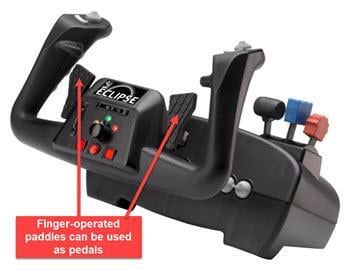
Some yokes have a set of hand-operated “paddles” (for example, the CH Products’ Eclipse Yoke), which can be used to control yaw with your fingers:
And even a 4th Alternative:
If you don’t have pedals but you do have a second joystick, you could assign one of its axes to the Yaw control. This might be a little weird to fly with, but X-Plane doesn’t care. If you are into 3D modelling, you no doubt have a 3d mouse – one of its axes could also be assigned to Yaw.