Posted on

An Unusual Source of useful Information

Whenever you purchase a new aircraft or scenery package, search for a review of it. 
Why? You have already bought it so why would you need a review?
The reason is quite astonishing… 

There is often far more useful information about the add-on in one of those reviews than there is in the official manual that the author supplies. Particularly in the case of airport payware. When a good manual is provided, reviews often supplement it with an abundance of information presented in a readily understandable format.
Those good people who write reviews must have some sort of magic power – they obviously don’t need any sleep! I am constantly astonished at how much work goes into one of these reviews. 

Don’t miss out.

The biggest X-Plane review site is found at X-PlaneReviews

Another good one is X-Plained

Posted on

Keep the logbook “clean”

Serious pilots are fanatical about maintaining a “clean” log file. But we also sometimes want to make a flight (maybe for testing purposes) that we don’t want recorded.

There is a simple way to do this:

image.jpeg

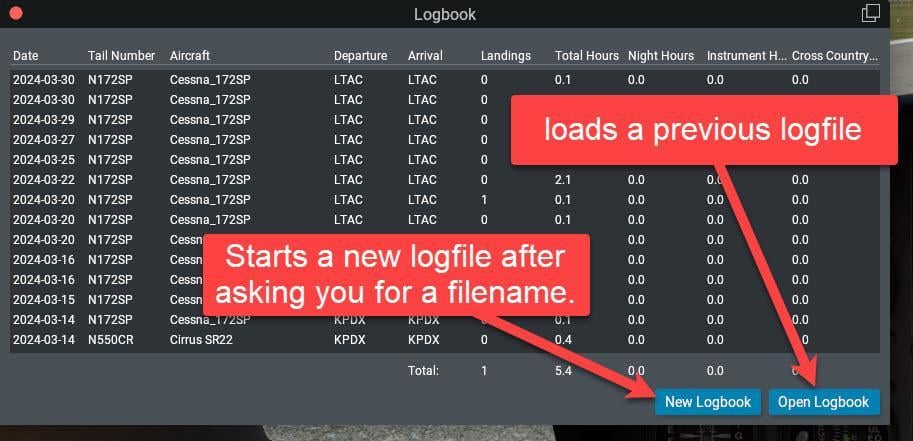
First, click the New Logbook button and give it a filename (with a .txt extension). Save it in the …\Output\logbooks folder.

Quit X-Plane.

From now on, all your flying will be recorded in the new logbook file.

When you are ready to resume logging your real flights to your real logbook, click the Open Logbook button and select the real logbook file. 

Quit X-Plane.

From now on, all your flying will be appended to the “real” logbook file with no mention of all your experimental flights that you don’t want recorded.

Alternative

Take a look at the logbook feature in Little Navmap

Posted on

Flight Planner – Little Navmap

All serious X-Plane pilots need a flight planner and as long as the resulting flight plan can be imported into X-plane, you can use any flight planner and you are good to go. However there is one absolute gem out there which many X-Plane pilots don’t know about. Little Navmap is a free, open-source application that functions as a comprehensive flight planner, moving map, navigation tool, and airport information system, fully supporting X-Plane 12. It serves as a powerful external tool designed to streamline pre-flight planning and enhance situational awareness during the flight. You can download it here. It is unbelievable that such a complex, capable, polished and incredibly useful piece of software is provided to us at no charge. A very special thanks to @albar965

You can download it here (Don’t let the date of the download post fool you, Little Navmap is constantly being updated)

LNM is really good at consolidating extensive aeronautical data and flight planning features into one interface. Its core purpose is to simplify the creation and execution of complex Area Navigation (RNAV) flight plans, A secondary purpose is to provide an understandable usable moving map to track our flight in real-time.

1.] Comprehensive Data Visualization: LNM displays crucial data layers, including airports, runways, NAVAIDs (VOR, NDB, ILS), airways, and airspace boundaries, which reflect the layout found in X-Plane’s stock and add-on scenery. This capability allows pilots to gain full positional awareness (moving map display) of the entire route and surrounding environment

2.] Advanced Route Construction: It allows graphical construction of flight plans using simple map clicks. LNM handles complex procedures, enabling the integration of SIDs, STARs, and approaches directly into the plan

3.] Performance Calculation: The tool facilitates detailed calculations, including creating and displaying an elevation profile that shows terrain, altitude restrictions, and the aircraft’s projected climb and descent path. It can also perform detailed flight and fuel planning, if necessary, utilizing calculated True Airspeed (TAS) and winds aloft data.

4.] Automation and Guidance: LNM automatically centers the map on the user aircraft and the next active waypoint during flight. It can also gather real-time performance data from the simulator aircraft to create custom performance profiles.

5.] Flight Plan Import: After you complete the flight Plan you can save it as an FMS file and import it directly into the G530, G1000 or into one of the FMC units of the bigger aircraft in X-Plane.

So, how does LNM work with X-Plane 12?

For Little Navmap to function as a real-time moving map and interact with X-Plane 12, a dedicated 64-bit plugin called “Little Xpconnect” is installed in the X-Plane plugins directory. This plugin facilitates the transfer of aircraft position, AI traffic, and weather information between the simulator and LNM. Sometimes “plugins” have a bad reputation for causing instabilities and strange behaviour in X-Plane 12. To the best of my knowledge, this plugin is 100% compatible with X-Plane 12 and has never, ever, caused any troubles in my system. It’s “performance/frame-rate cost” when flying is minimal.

You can either use Little Navmap on the “flying” computer simultaneously with X-Plane (ideally with a dual-monitor system), or you can use it on a second computer which links to the “flying” computer via your local network (Ethernet or WiFi). I prefer the latter since it allows me to use more than one screen for flying, keeping LNM completely separate.

To get the most out of LNM, there is a large manual available (online or downloadable), so RTFM !

To get even more out of Little Navmap take a look at this book on Flying-Low’s stable

Posted on

The best way to diagnose X-Plane problems – particularly calibration issues is to look at the datarefs.
There are two ways to do this – Using the built-in dataref display or using a freeware plugin called DataRefTool

For example, we often need to check the actions of the parking brake:

You can set a dataref display to show in the screen by clicking Settings –> Data Output and selecting Gear and Brakes:

image.jpeg

The display will look like this:

image.jpeg

Alternatively, use the Dataref plugin which shows more information and is much easier to read:

image.jpeg

To get the Dataref tool go to the DataRefTool web site and download it. The documentation is on the site. This tool is particularly useful for seeing how often the dataref changes by colour-coding the display.

The Dataref tool was created by Lee C Baker is works with X-Plane 11 and X-Plane 12

Once you have finished tinkering, make sure to completely disable the dataref tool plugin before actually flying.

Posted on

Disabling Plugins

When ever X-plane starts running slowly/stutters/jerks or generally misbehaves, the first thing to do is to disable any unused/outdated plugins.
There are two ways to do this:

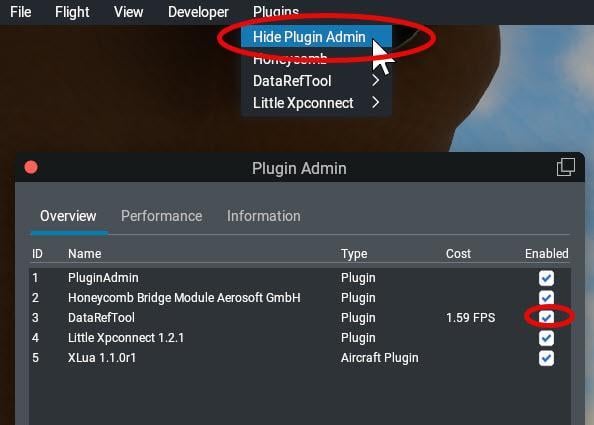
The first method is to go to the Plugins pull-down menu, and click the “Show Plugin Admin” option. This brings up a list of installed plugins and gives you an idea of how many resources they are consuming.

Disable plugin.jpg

Click the “Enabled” checkbox to enable or disable that plugin.

The second method is to completely remove all traces of that plugin by deleting the folder containing the plugin (individual plugin folders are found in the …X-Plane 12/Resources/plugins folder). If you don’t want to delete the plugin because you may want to activate it again, simply move the plugin’s folder to a location outside of the X-Plane 12 folder (like, for example, to the desktop).

Sometimes simply disabling the plugin using the Plugin Admin window is not enough as it still leaves the plugin in the plugin folder and – depending how the plugin is written – this may still have some residual effect. So to be sure that the plugin has no effect, delete or move it. To ensure that the plugin does not start gain the next time X-Plane is started, it needs to be deleted or moved out of the plugins folder.

Note: X-Plane does not use the Windows registry so simply moving the plugin elsewhere outside the X-Plane 12 hierarchy of folders without deleting it will remove its effect entirely.

See also What to do if X-Plane constantly crashes

Posted on

What to do if X-Plane constantly crashes.

I think these “commandments” should be permanently engraved for posterity.

Here are the verbatim instructions from @Janov on the X-Plane.org forum who has been forced to produce countless variations every few weeks or so.

On 6/28/2025 at 6:28 AM, Janov said:

This is a guideline on how to cure your X-Plane problems of crashing or device loss errors (DLE):

1.) Make sure your operating system is in prime shape. No overclocking. Latest drivers. Default graphic settings (no esoteric Nvidia settings, etc.), no paranoid anti-virus, no “I got this on a cool reddit forum with Windows tips” stuff.

2.) Remove all third party content from your X-Plane installation. Physically move them somewhere else, disabling them in X-Plane is not enough. This includes plugins, aircraft, scenery. If you are not sure you can do this reliably, just delete everything and install X-Plane fresh.

3.) Fly a default aircraft for a very long time. Let it go on autopilot if you don`t have the time, but fly a default aircraft in a default (“vanilla”) simulator setup until it crashes or you are sure that it is stable. The longer the better, I personally recommend to use it in this state for several long flights until you declare it stable.

4.) If the simulator crashed or you suffer a device loss error, file a bug with Laminar Research (google X-Plane bug reporter). Wait for LR to fix the problem. You can now post here and let us know about your problem, maybe someone can spot something wrong with your system that you missed.

5.) If you completed the long testing run with no problem, you can install your FIRST add-on. ONLY ONE! Repeat the long duration testing run. If XP crashes or has a DLE, you have found the offending third-party item. Do not use it anymore. Contact the developer of said item to fix it.

6.) Add your NEXT add-on. Repeat testing, discarding all add-ons that cause crashes or DLE´s.

Remember, there are no “must have” add-ons. There are only compatible or incompatible add-ons. It is the developer´s responsibility to make his add-on compatible or take it up with LR if the problem is not on his side.